Verizon Wireless Network Extender - View MAC Address
Here's how to view the MAC address on your Network Extender.
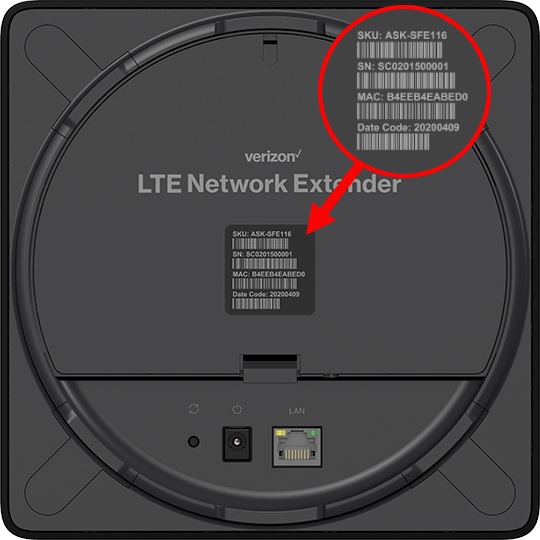
LTE Network Extender 3
- From the back of the device, locate the MAC ID on the barcode label.A magnifying tool may be needed to view the info.
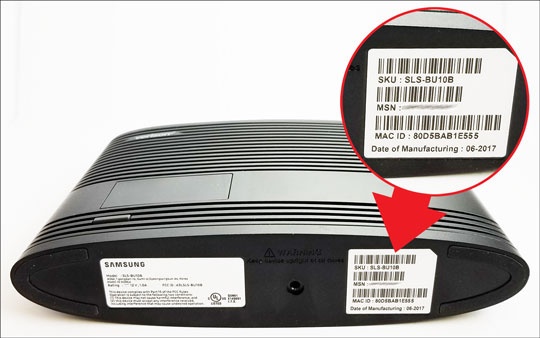
4G LTE Network Extender 2
- From the bottom of the device, locate the MAC ID on the barcode label.A magnifying tool may be needed to view the info.
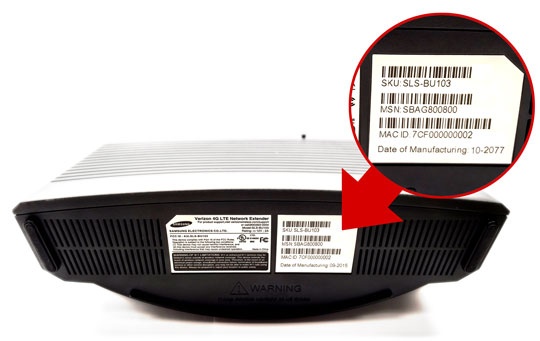
4G LTE Network Extender
- From the bottom of the device, locate the MAC ID on the barcode label.A magnifying tool may be needed to view the info.
4G LTE Network Extender for Enterprise 2
- From the bottom of the device, locate the MAC ID on the barcode label.A magnifying tool may be needed to view the info.
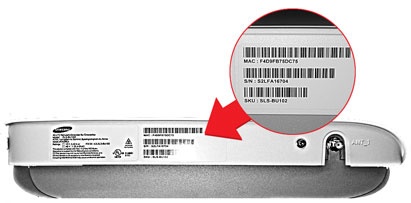
4G LTE Network Extender for Enterprise
- From the bottom of the device, locate the MAC ID on the barcode label.A magnifying tool may be needed to view the info.